SFDT — Salesforce DevTools for VS Code
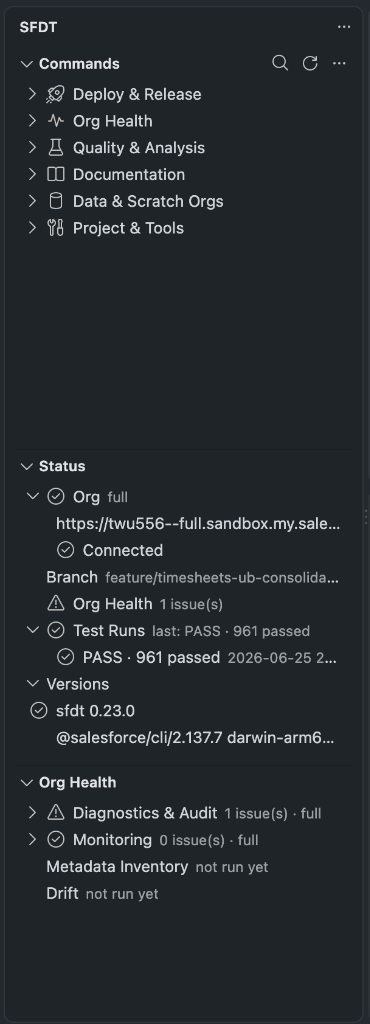
The SFDT — Salesforce DevTools extension drives the @sfdt/cli from inside VS Code.
As of v0.2.0 it is a full command center: a grouped Commands tree for the entire CLI, a
live Status panel, the Org Health view, an org picker, the embedded dashboard, and per-org window
theming.
- Marketplace:
sfdt.sfdt-devtools - Version:
0.7.0 - Publisher:
sfdt - VS Code engine:
^1.80.0 - License: Apache-2.0
The extension is a thin UI shell. All the real logic — audit, deploy, monitor, and the
rest — lives in the CLI. The extension spawns sfdt, reads the JSON snapshots it writes, and
renders them. That means it requires @sfdt/cli to be installed.
What it surfaces
The SFDT activity-bar container holds three views plus a status bar:
| Surface | What you get |
|---|---|
| Commands view | A grouped tree of the entire CLI surface (30+ commands / 50+ subcommands) across six categories. Click to run in a dedicated SFDT integrated terminal (live output, interactive prompts); destructive commands confirm first. Right-click to Run, Copy, or Open docs. |
| Status view | The active org (alias, instance URL, connection), git branch, an Org Health rollup, and sfdt/sf versions with an “update available” hint. An org picker switches the target org from sf org list. |
| Org Health view | A tree of the latest audit, monitor, scan, and drift results; click a check to re-run it. Auto-refreshes when a logs/*-latest.json snapshot changes. |
| Embedded dashboard | The full sfdt ui web dashboard inside an editor tab (authenticated via the CLI launch token). |
| Onboarding & theming | A welcome flow when the CLI is missing or the project isn’t initialized, plus per-org window tinting (prod = red, sandbox = orange, scratch = green). |
Next steps
Last updated on