Web Dashboard
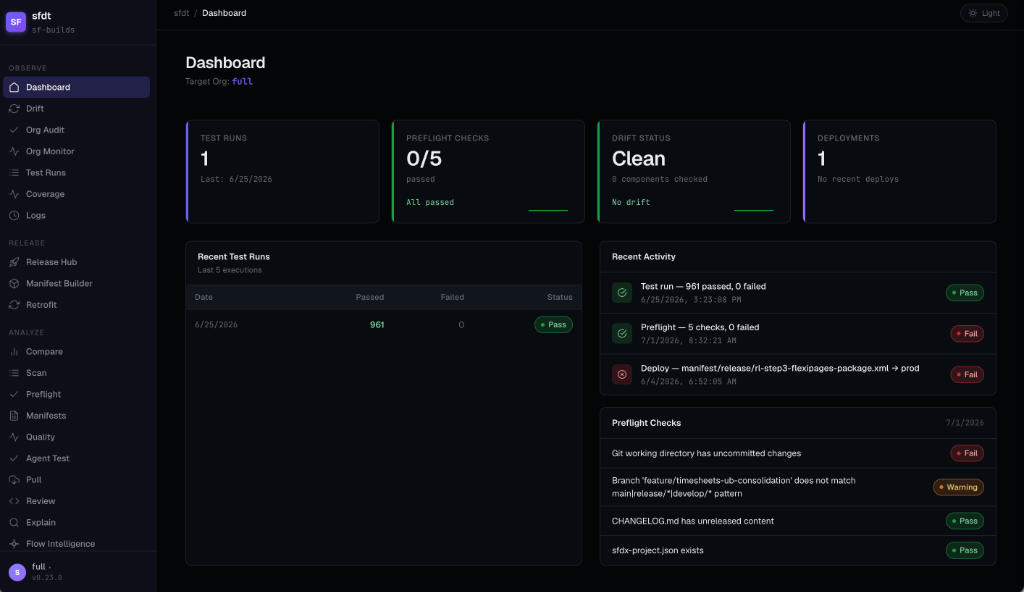
sfdt ui starts a local Express server and opens the SFDT dashboard in your browser. It reads
log/result files from your project’s logDir (default logs/) and can run several commands live.
sfdt ui                   # opens http://localhost:7654
sfdt ui --port 8080       # custom port
sfdt ui --no-open         # start without opening the browser
When installing from source, build the dashboard once with npm run build:gui. The published
npm package already includes a pre-built gui/dist/, so end users don’t need to build it. If
gui/dist/ is missing, sfdt ui shows a build-instructions page instead.
Pages
All 28 pages, in nav order — the page list is generated from the dashboard’s own route registry, so it cannot drift from the app:
| Page | Group | What it shows | Data source |
|---|---|---|---|
| Dashboard | Observe | Summary stat cards: last test run, preflight, drift | preflight-latest.json, drift-latest.json, test-results/ |
| Drift | Observe | Filterable component table (All / Clean / Drift); run inline | drift-latest.json |
| Org Audit | Observe | Org health: audit trail, licenses, MFA, unused Apex, API versions; Run now (SSE) | audit-latest.json |
| Org Monitor | Observe | Limits, errors, health score, backup history; Run now (SSE) | monitor-latest.json |
| Test Runs | Observe | Apex test history with coverage bands; run tests inline | test-results/*.json |
| Coverage | Observe | Live org-wide Apex coverage (with threshold band) plus the per-run coverage trend | /api/coverage, test-results/ |
| Logs | Observe | Searchable log viewer with pagination and raw output | logs/* |
| Release Hub | Release | Manifest picker, changelog & release-note editing, deploy | manifest/release/, release-notes/, CHANGELOG.md |
| Manifest Builder | Release | Changeset-style builder: browse org or local metadata by type, tick components (or whole types → * wildcard), live XML preview, save additive or destructive manifests | /api/manifest/discover-org, /api/manifest/discover, /api/manifest/render, /api/manifest/save |
| Retrofit | Release | Cross-org retrofit: retrieve from a source org, commit, smart-deploy to a target (validate-only or execute) | /api/retrofit |
| Compare | Analyze | Source-only / target-only / both; side-by-side XML diff; export package.xml | compare-latest.json |
| Scan | Analyze | Full metadata inventory with search & filter | /api/scan |
| Preflight | Analyze | Per-check pass/warn/fail; run preflight inline | preflight-latest.json |
| Manifests | Analyze | Generated package.xml artifacts — preview & download | manifest/release/*.xml |
| Quality | Analyze | Code/test quality results; stub generator with dry-run preview | quality-latest.json |
| Agent Test | Analyze | Agentforce agent-test runs (AiEvaluationDefinition) with pass/fail history | /api/agent-test |
| Pull | Analyze | Smart-delta / preview / full retrieve with live streaming | /api/pull (SSE) |
| Review | Analyze | AI code-review results across five categories | review-latest.json |
| Explain | Analyze | AI deployment-log analysis | explain-latest.json |
| Flow Intelligence | Analyze | Flow health scores, trigger conflicts, subflow graph | /api/flow/quality |
| Dependency Graph | Analyze | Seed + expand-on-click D3 dependency graph (references / referenced-by, capped 50/direction); Gaps toggle for source-parsed references the Tooling API misses; Show-inferred overlay renders missing edges as dashed lines | /api/dependencies/resolve, /api/dependencies/neighbors, /api/dependencies/gaps |
| SOQL Console | Analyze | SOQL/SOSL console: sObject search + field/relationship browser, query validation (org LIMIT 0 round-trip), query plans, bounded execution with JSON/CSV export | /api/soql/* (soql-runner.js) |
| Scratch Orgs | Analyze | Active scratch orgs, plus create / delete / pool-fill actions | /api/scratch |
| Data Sets | Analyze | Defined sf data tree data sets, plus export / import / delete actions | /api/data |
| Installed Packages | Analyze | Managed and unmanaged packages installed in the target org, with a per-package note; a package with no recorded latest version reads as untracked rather than guessed at | /api/installed-packages |
| Documentation | Analyze | Docs config, plus a generate action | /api/docs |
| Notifications | Config | Notification channels (redacted), per-channel event filters, and a send-test action | /api/notifications |
| Settings | Config | View/edit config; initialize a project from the GUI | .sfdt/config.json |
Data appears automatically after running the corresponding CLI commands (sfdt test,
sfdt preflight, sfdt drift, …) that write JSON result files.
SOQL Console
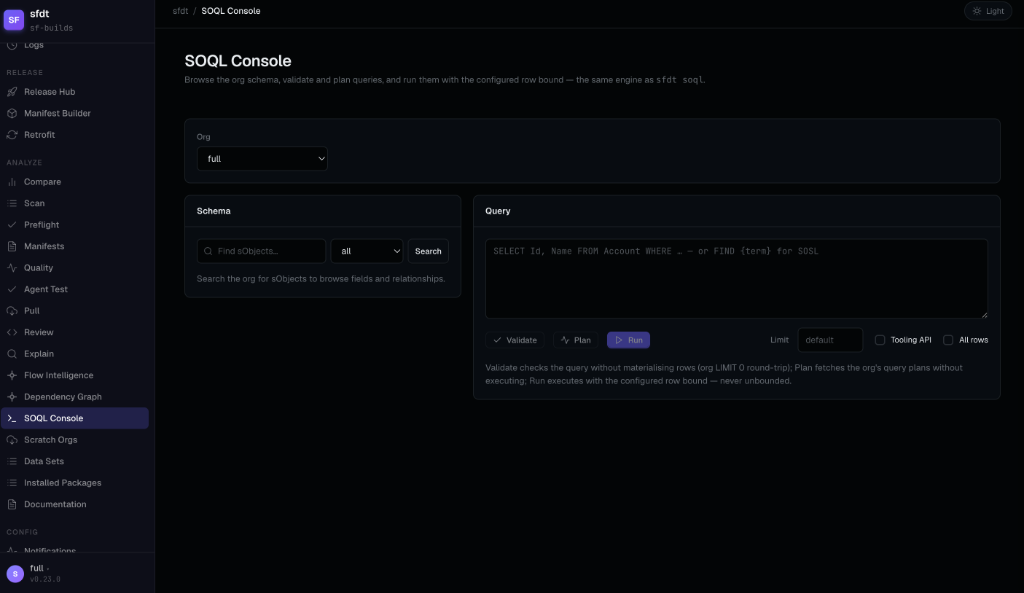
The SOQL Console page (deep-linkable at /soql) puts the whole
sfdt soql family on the dashboard. Its /api/soql/* routes
are thin wrappers over the CLI’s own soql-runner.js — the single query/schema engine shared with
the CLI, MCP, and VS Code — so results, bounds, and error messages are identical across surfaces.
- Schema browser — search sObjects (all / custom / standard), then browse a describe: field types, active picklist values, reference targets, and a Relationships tab with parent lookups (dot notation) and child relationships (subqueries). Query this seeds the editor with a starter query.
- Validate — local static checks plus an org
LIMIT 0round-trip that never materialises rows. An unreachable org degrades to a local-only verdict with a warning — never a fabricated org pass. - Plan — the org’s query plans via the REST explain endpoint; the query is never executed.
- Run — bounded execution, never unbounded: the row cap comes from the limit field or
soql.defaultLimit(default 200), clamped tosoql.maxLimit(default 2000). The result shows the applied bound (appended/kept/clamped) and a truncation warning when the org holds more rows.FIND {…}queries route to SOSL automatically. Tooling API and deleted/archived-rows toggles match the CLI flags. - Export — download the raw records as JSON, or as CSV rendered by the runner’s own CSV
shaping (nested parent fields flatten to dot-path columns like
Owner.Name) — the same outputsfdt soql query --outwrites.
Manifest Builder
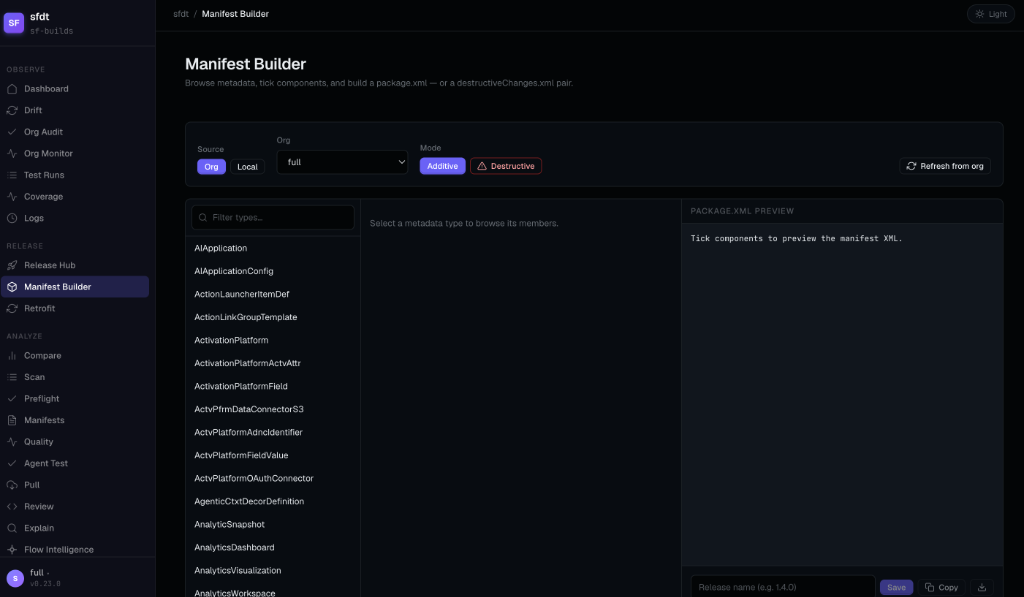
The Manifest Builder page (Release group) is a changeset-style package.xml builder: browse
metadata by type, tick checkboxes, watch a live XML preview, and save the result into your
manifest directory (manifestDir, default manifest/release/).
- Two sources. The Org source lists an org’s real inventory (
sf org list metadata-types/sf org list metadata), served from the latest Scan snapshot when it’s fresh — the Refresh from org button re-queries live. The Local source globs your local source tree instead. If the org can’t be listed you get a visible error with a Retry button — never a silently empty tree. - Whole-type wildcard. Ticking Entire type (
*) for a metadata type emits<members>*</members>instead of enumerating every member. - Live preview, one renderer. The XML pane updates on every tick and is rendered
server-side by the same engine every SFDT surface uses (
renderPackageXml) — what you preview is byte-for-byte what gets saved. - Selections persist per org in your browser (and separately for the Local source), with a one-click Clear all.
- Saving writes
rl-<name>-package.xml; existing files are never overwritten (you get a conflict error instead), and thedeployed/archive folder is refused. Copy and download buttons are there for ad-hoc use.
Destructive mode
Switching the mode toggle to Destructive turns the selection into a deletion manifest, with a prominent warning. Saving writes a paired set:
| File | Content |
|---|---|
rl-<name>-destructiveChanges.xml | The components to delete from the target org |
rl-<name>-package.xml | An empty package — the Metadata API requires a package.xml alongside destructive changes |
When sfdt deploy picks up a release whose manifest has a -destructiveChanges.xml companion,
the SFDT_DESTRUCTIVE_TIMING setting controls when the deletions run relative to the
deploy: pre (delete before deploying), post (after — the default), none (skip deletions),
or only (run only the destructive operation). The Release Hub deploy step exposes the same
choice as radio buttons.
Live command runners
The Test Runs, Preflight, Drift, Compare, Pull, Audit, and Monitor pages have Run buttons that trigger the underlying command over a Server-Sent Events stream — output appears line-by-line in real time, exactly like running the CLI.
The Scratch (create / delete / pool-fill), Data (export / import / delete), and Docs (generate)
pages add real mutating actions behind in-app confirmation dialogs — which also work inside the
VS Code-embedded dashboard (no window.confirm).
AI chat drawer
The toolbar’s Ask AI button opens a sliding chat panel. Pages with relevant output (Review, Explain, Drift, Preflight) pre-fill the chat with that context so you can ask follow-ups without copy-pasting.
Security
The dashboard is local-only and hardened against page-driven attacks:
- Binds to
127.0.0.1— never exposed to the network. - Per-launch auth token prevents unauthorized access to a running process.
- CSRF protection — all mutating routes require an
X-SFDT-CSRFheader. - Read-only AI sandbox — the AI chat’s tool access is restricted to
Read,Grep,Glob(no Bash/Write/Edit), so a prompt injection in page context can’t drive tool execution. - Log redaction at ingest — secrets are redacted before reaching the in-memory buffer or the live SSE stream.
The same bridge endpoints the dashboard exposes are what the Chrome extension talks to — see The Bridge.